
How Long Does Google Take to Recognise an SEO Fix?
You’ve fixed a page, published the changes, and checked Google. Yet the old title still appears, the page remains unindexed, or rankings have not improved. How long should you wait?
At Google Search Central Live Deep Dive Europe in Barcelona on 2nd October 2026, Google analyst Gary Illyes presented timing estimates for crawling, indexing and changes appearing in Search. According to attendee John Campbell’s event recap, refreshing an existing URL typically takes around 30 days. This gives website owners a useful new reference point for understanding how long Google takes to recognise an SEO fix.
Google’s Latest Reported Timelines
The following figures were reported by Search Engine Journal after the event. They are estimates from Google’s reported internal analysis, not guaranteed deadlines. The complete timing slides have not been published as official Google documentation.
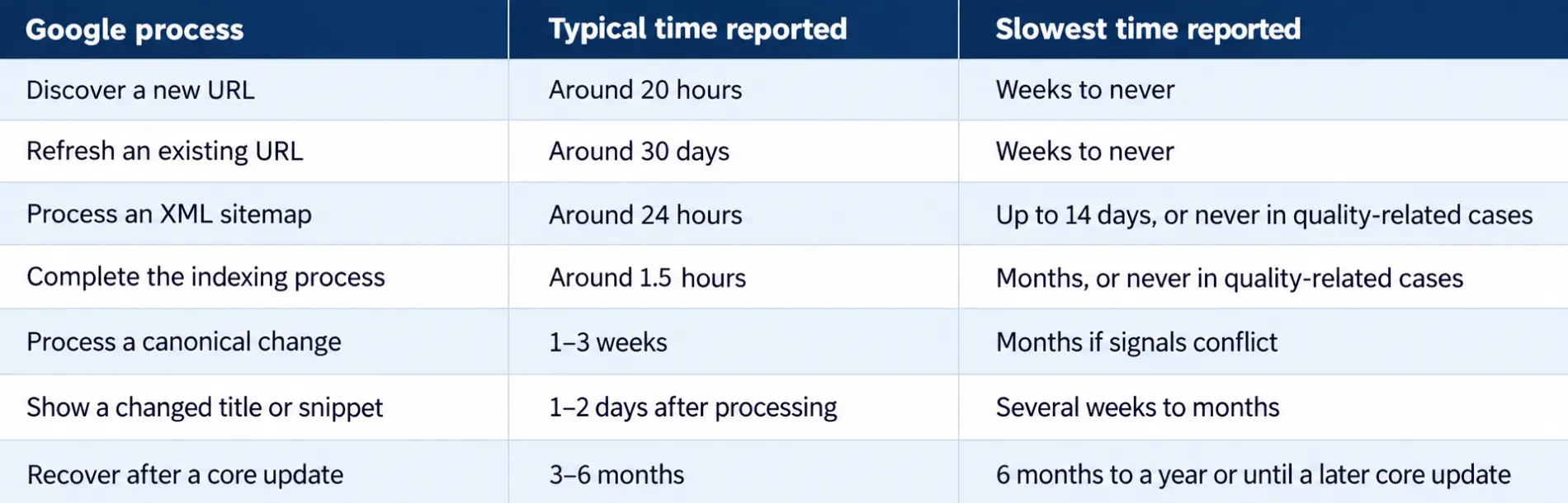
These timelines cover different processes. They should not be added together to predict an exact date. Your site’s crawl history and indexing status are better guides to what is happening with a particular page.
Google’s official recrawl guidance also explains that crawling can take days to weeks and that requesting indexing does not guarantee inclusion in Search.
Why Google May Not Show Your Changes
Google handles website changes through three connected stages:
- Crawling: Googlebot fetches the page.
- Indexing: Google processes the page and decides whether to include it in its index.
- Serving and ranking: Google selects the content and position shown for a search.
A page must be crawled before Google can process its updated content. Even after indexing, its rankings may remain unchanged.
For example, changing a title tag can affect how Google displays a result, but it does not automatically make the page more relevant than competing pages. Similarly, fixing a technical error can remove an indexing barrier without improving the content itself.
Understanding which stage is delayed helps you choose the right next action instead of making unnecessary changes.
How to Check Whether Google Has Processed Your SEO Fix
-
Confirm that the fix is live.
Open the published URL and check its response status, updated content, canonical tag, noindex directive and robots.txt rules. If the page depends on JavaScript, make sure Google can access its important content.
-
Check the last crawl in Google Search Console.
Use the URL Inspection tool to review the indexed version, indexing status and last crawl date. Run a live test to see whether Google can access the current page.
If the last crawl happened before you made the change, Google may not have processed it yet. For an important URL, you can request indexing. For larger groups of pages, maintain an accurate XML sitemap and make sure important URLs have crawlable internal links.
-
Investigate pages that are crawled but not indexed.
Open the Page indexing report and look for problems with canonical selection, redirects, duplicate content or accessibility. Check whether the page offers distinct value rather than repeating information already available elsewhere.
Google’s canonical troubleshooting guide explains how conflicting signals can delay the selection of a preferred URL.
-
Measure performance after processing.
Once Google has revisited the page, monitor impressions, clicks, search queries and average position in Search Console. Compare similar periods and look at the affected pages rather than relying on a single keyword check.
If a page is indexed but rankings remain flat, investigate search intent, content quality and competition. The problem may no longer be crawling or indexing.
When Should You Wait, and When Should You Act?
Use the evidence from Search Console to decide your next step.
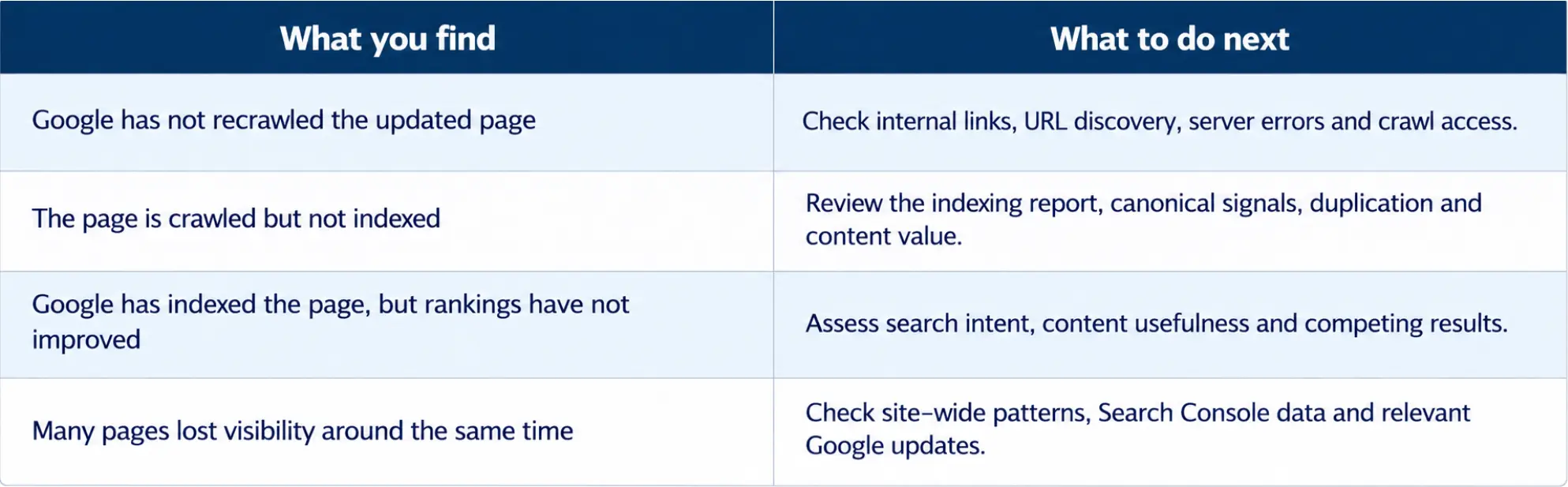
Do not wait a full month before investigating a broken page. Equally, do not keep changing a working page simply because rankings have not improved within a few days.
For broad quality issues, expectations should be longer. Google’s core update guidance explains that improvements may take several months to become apparent, and recovery to previous rankings is not guaranteed. Its traffic-drop guide can help you investigate whether a decline affects one page or the wider website.
Conclusion:
Google may take days or weeks to process a change, while broader ranking improvements can take months. The important step is to identify what is delaying progress and fix the actual problem.
If technical errors, indexing issues or weak page performance are affecting your website, JODBS SEO Services can help you identify the cause and plan the right improvements.